

What Is a Ticketing System? How It Works and the Best Options
A ticketing system is software that turns every customer or employee request into a ticket: a single record with an owner, a status, a priority and a full history. Emails, chats, calls and form submissions all land in one queue, so nothing gets lost and everyone can see what is open, who is on it and what was already said.
This guide explains what a ticketing system is, how a ticket moves from “new” to “solved”, the features that matter, and what the best help desk ticketing systems cost in 2026.
What is a ticketing system?
A ticketing system is the core of most help desk software. Without one, support requests sit in personal inboxes and chat threads. Two people answer the same customer. Another customer waits a week because their email got buried.
A ticketing system fixes that by giving every request:
- An ID number so you can refer to it later.
- An owner, the agent or team responsible for solving it.
- A status, such as New, Open, Pending or Solved.
- A priority, so urgent problems go first.
- A history of every reply, internal note and change.
Businesses use ticketing systems for customer support, internal IT support, HR requests and facilities requests. The idea is the same in each case: one request, one ticket, one person accountable.
How does a ticketing system work?
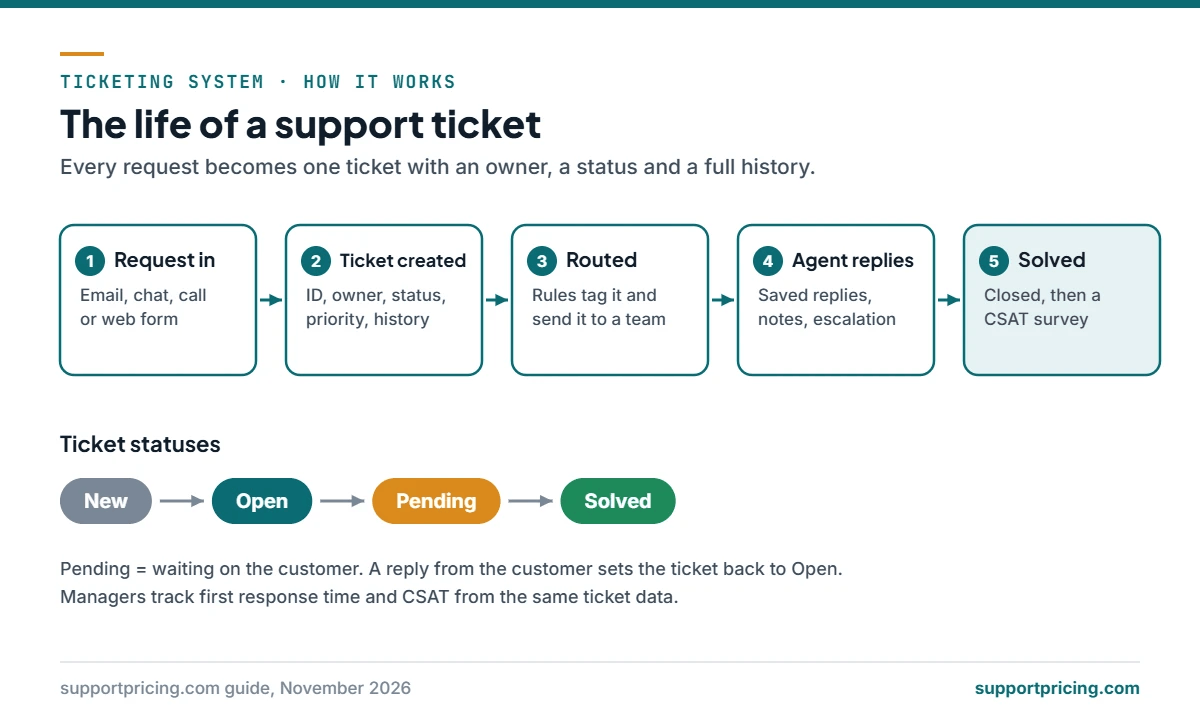
Most ticketing systems follow the same basic flow:
- A request comes in. A customer sends an email, starts a chat, calls, or fills in a web form.
- The system creates a ticket. It records who asked, what they asked, the channel and the time.
- Rules sort it. Automations tag the ticket, set a priority and route it to the right team. A billing question goes to billing; a bug goes to technical support.
- An agent replies. The agent answers from inside the ticket, often using a saved reply or a knowledge base article. Customers see a normal email or chat message.
- The ticket waits or escalates. If the agent needs more information, the ticket is set to Pending. If it is too complex, it moves to a senior agent or another team.
- The ticket is solved and closed. Many systems then send a short satisfaction survey.
Because every step is recorded, managers can measure how fast the team responds and how happy customers are. Two of the most common numbers are first response time and CSAT.
Types of ticketing systems
- Customer support ticketing handles questions from customers. Examples include Zendesk, Freshdesk and Help Scout.
- IT ticketing (IT service management) handles requests from employees, like password resets, new laptops and software access. These tools often follow ITIL practices and track devices and change requests.
- Open-source ticketing is software you can host on your own server for free, such as osTicket, Zammad and FreeScout. You pay for hosting and your own time instead of a monthly seat fee. See our guide to open-source ticketing systems.
- AI-first ticketing adds AI agents that answer common questions on their own and hand harder ones to people. Read more in best AI help desk software.
Key features of a ticketing system
- Shared inbox: email, chat, social and phone requests in one queue.
- Assignment and routing: send tickets to the right person automatically.
- Saved replies: reuse answers to common questions. Our 30 canned responses are free to copy.
- Internal notes: discuss a ticket with teammates without the customer seeing it.
- SLAs: set response and resolution targets and get warned before you miss them.
- Knowledge base: help articles that let customers solve problems themselves, which lowers ticket volume. Measure it with our ticket deflection calculator.
- Reports: ticket volume, response times, resolution times and satisfaction scores.
- Integrations: connections to your CRM, billing tool, store or Slack.
- AI tools: reply suggestions, summaries and automated answers. These are often billed separately.
Benefits of using a ticketing system
- No lost requests. Every question has an owner until it is solved.
- Faster replies. Routing and saved replies cut the time to first answer.
- Better teamwork. Anyone can pick up a ticket and see the full history.
- Clear numbers. You can see workload, busy hours and recurring problems.
- Happier customers. People do not have to repeat themselves.
What are the best help desk ticketing systems?
Prices below are starting prices from each vendor’s own pricing page, billed annually, as of November 2026. AI features usually cost extra. Use our help desk cost calculator to compare the full bill for your team size.
| Tool | Starting price | Good for |
|---|---|---|
| Zoho Desk | From $7 per user/month | Low-cost teams already using Zoho apps |
| Zendesk | Support Team $19 per agent/month; Suite Team $55 | Growing teams that want a large app marketplace |
| Freshdesk | Growth $19 per agent/month; Pro $55 | Small and mid-size teams that want many features per dollar |
| Help Scout | Free plan; paid from $25 per user/month | Email-first teams that want a simple, friendly inbox |
| Intercom | From $29 per seat/month, plus about $0.99 per AI resolution | Chat-heavy SaaS teams that want an AI agent |
| Chatwoot | Free to self-host; cloud from $19 per agent/month | Teams that want open source with a hosted option |
| Helpin | Free to self-host; Cloud $79/month billed annually | Teams that want inbox, AI agents, CRM and docs in one open-source tool |
| osTicket, Zammad, FreeScout | Free open-source software (you pay for hosting) | Teams with technical skills that want full data control |
Looking for options beyond the big names? Compare Zendesk alternatives, Freshdesk alternatives and Help Scout alternatives.
How to choose a ticketing system
- Count your agents. Most tools charge per agent, so team size drives the bill.
- List your channels. Email only? Add chat, phone or social later? Pick a tool that covers what you need now and next year.
- Price the AI separately. Per-resolution AI fees can cost more than seats once volume grows. See our AI resolution cost comparison.
- Check reporting. Make sure you can track response time and satisfaction from day one.
- Test with real tickets. Use a free plan or trial and run a week of real requests through it.
- Decide on hosting. If you must keep data on your own servers, shortlist open-source tools.
Frequently asked questions
What is a ticket in customer service? A ticket is a record of one customer request. It holds the message, the customer’s details, the agent assigned, the status and every reply until the issue is solved.
Is a ticketing system the same as a help desk? Not exactly. A help desk is the whole support setup: people, process and software. The ticketing system is the part of the software that tracks each request.
Do small businesses need a ticketing system? Once two or more people answer customer messages, a ticketing system stops double replies and missed emails. Several tools, including Help Scout, have free plans, and open-source options are free to self-host.
What is the difference between a ticketing system and a CRM? A CRM tracks customers and sales over time. A ticketing system tracks individual support requests. Many businesses connect the two so agents can see customer history inside each ticket.
Can AI replace a ticketing system? No. AI agents work inside a ticketing system. They answer simple questions automatically, and the ticketing system still tracks those conversations and hands harder ones to people.


